Vows
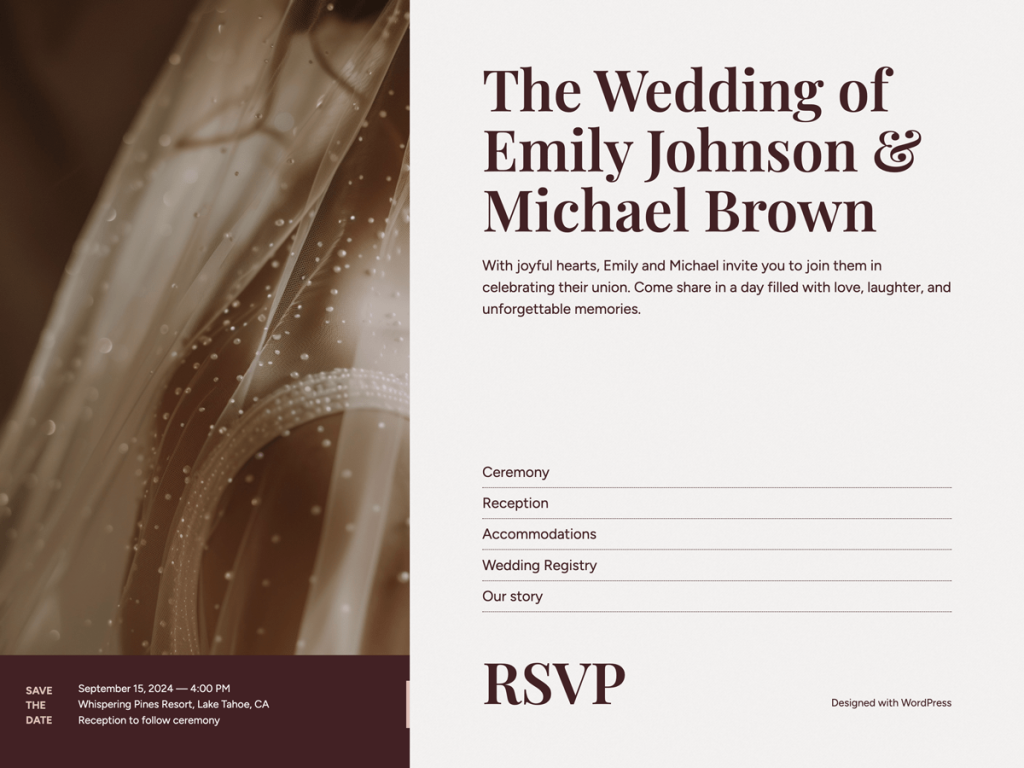
Wedding stationery aesthetics translate effortlessly into Vows, which greets visitors with warm alabaster (#f4f2f1), deep burgundy (#422125), and muted blush (#e0bfb8). Rather than forcing a sprawling multi-page site, it focuses on a refined 660px hub tailored for engaged couples sharing registries, RSVPs, and venue links. I was particularly impressed by its seven-font roster—including Playfair Display, Literata, Aventine, Figtree, and Albert Sans—plus five rich variations like empress, mallard, and pyramid.
Eight full templates covering both front-page and home sit alongside 18 block patterns, hidden template parts, and two-column block support inside the Site Editor. Because it skips a separate wide-block breakpoint, layouts stay intimate and cohesive across screens when I preview mobile views. At 80 active installs with no ratings yet, I find it ideal for couples wanting an elegant, custom-owned alternative to third-party link trees.
Notes
- Stationery Elegance: Blush (#e0bfb8) and burgundy (#422125) tones paired with Playfair Display and Literata bring tactile wedding-invite polish to the screen.
- Rich Customization: Eight templates, 18 block patterns, and five distinct color variations (empress, lavastone, mallard, marine, pyramid) simplify tailoring.
- Caveat: Designed narrowly as a 660px link-in-bio wedding hub with no wideSize width token and just 80 active installs, it isn’t meant for complex magazines.
Verified Specifications
- Developer: Automattic
- Active Installations: 80+
- Reviewed Version: v1.2.3
- Compatibility: WordPress 6.0+, PHP 7.2+
- Architecture: Block Theme (FSE)
- Key Capabilities: Full Site Editing, Playfair Display fonts, 5 style variations, 18 block patterns, 8 templates
Verdict: I think Vows is a genuinely tasteful link-in-bio hub for engaged couples who want stationery charm under their own domain. — Official WordPress.org Directory Entry
Discussion
0 Comments