Brightblog
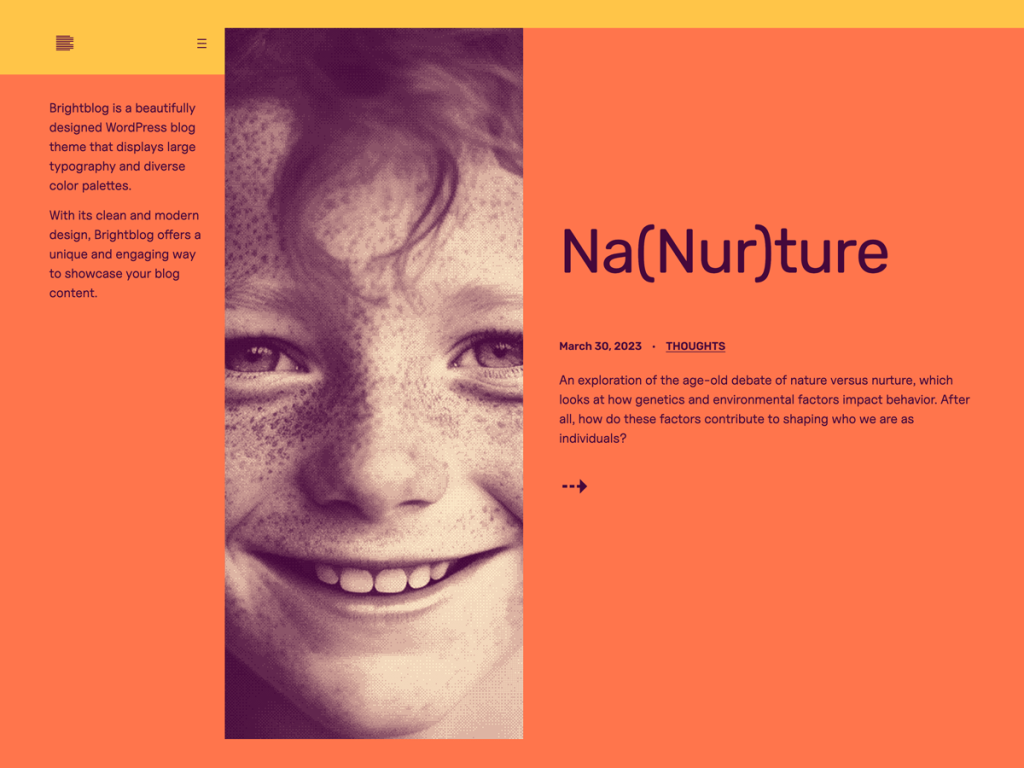
Walking straight into saturated tangerine-coral (#ff754c), deep plum ink (#45083b), and warm buttercream (#ffefcc) with marigold (#ffc549) accents, Brightblog earns every syllable of its name. Its typography mixes expressive Platypi serifs with geometric Rubik, linik-sans, and Uncut Sans inside a two-column layout anchored by a left sidebar. I enjoy how five bold style variations—coral-dreams, frozen-pink, kiss-goodbye, mint-boneyard, and peachy-ocean—keep that high-voltage look easy to remix.
Seven templates and nine block patterns power the layout, including dedicated sidebar and footer-pages modules plus a 640px post column that expands to 1200px for wide blocks. Featured images integrate cleanly into the news-style feed without flattening hierarchy, and swapping palettes took me seconds in Global Styles. With 70 active installs and no user ratings yet, I see Brightblog fitting culture newsletters, indie commentary blogs, or playful editorial desks.
Notes
- Vibrant Blocking: Saturated coral (#ff754c), deep plum (#45083b), and five colorful style variations give text-heavy blogs instant graphic punch.
- Left-Sidebar Flow: Dedicated sidebar and footer-pages block patterns organize two-column navigation neatly alongside 1200px wide blocks.
- Caveat: High-contrast coral and neon backgrounds can fatigue long-form readers, and 70 active installs show very limited real-world adoption.
Verified Specifications
- Developer: Automattic
- Active Installations: 70+
- Reviewed Version: v1.0.2
- Compatibility: WordPress 6.0+, PHP 7.2+
- Architecture: Block Theme (FSE)
- Key Capabilities: Full Site Editing, Platypi & Rubik fonts, 5 style variations, 9 block patterns, Left sidebar, Wide blocks
Verdict: I’d use Brightblog for energetic opinion blogs or newsletters that want bold color-blocking and oversized headings without clutter. — Official WordPress.org Directory Entry
Discussion
0 Comments