HVACool
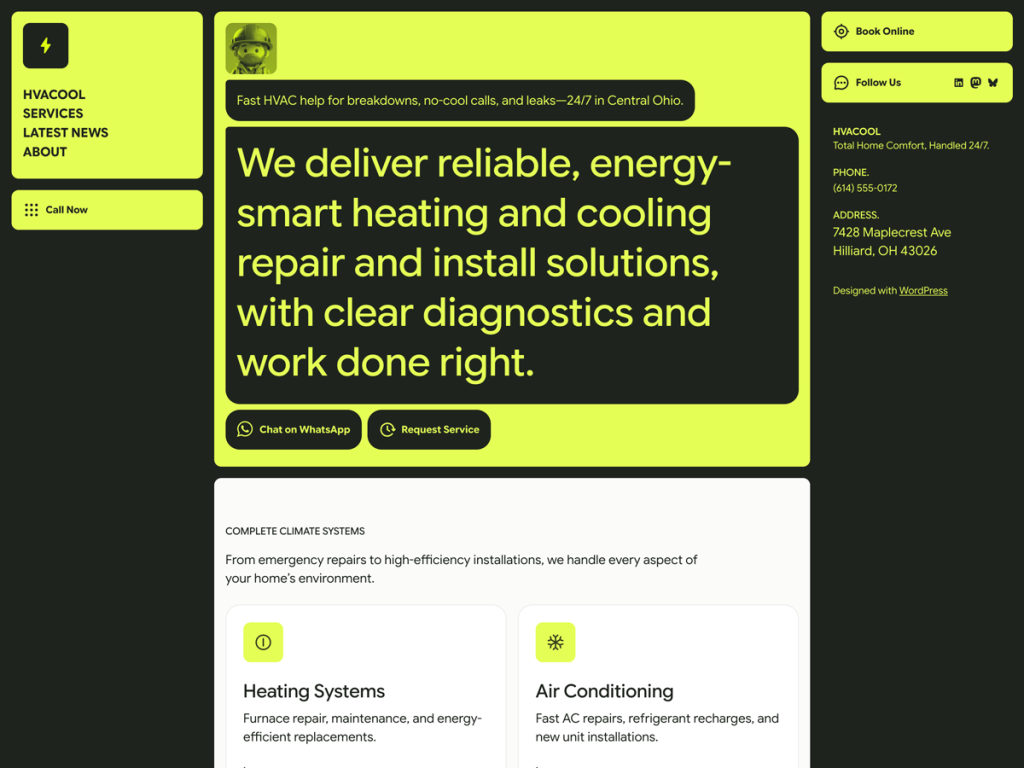
Most trade-service themes drown in generic stock clutter, so HVACool’s sharp utilitarian palette of crisp off-white (#FBFCFA), deep charcoal (#1E241D), and electric lime (#E4FE55) immediately caught my attention. Pairing Google Sans Display headings with Google Sans Text body copy keeps emergency phone numbers, maintenance plans, and service areas legible at a glance. I like how the 700px reading column expands cleanly to 1280px wide sections with two-, three-, and four-column grids.
Inside the Site Editor, I found seven complete templates and 11 block patterns covering front-page, newsletter, and related-posts layouts, alongside style variations like bhle-was, monochrome, and purpul. Everything operates natively through Full Site Editing without legacy PHP template overrides. With only 90 active installs and no user reviews yet, I think it fits HVAC technicians or local home-service contractors wanting a fast, no-nonsense block presence.
Notes
- Palette & Type: Google Sans Display and Google Sans Text pair naturally with dark charcoal (#1E241D) and punchy lime (#E4FE55) calls to action.
- Block Architecture: Seven FSE templates, 11 patterns including newsletter and related posts, and multi-column grid support make layout assembly straightforward.
- Caveat: Sitting at 90 active installs with zero ratings and generic pattern slugs, you may still need separate intake form plugins for service requests.
Verified Specifications
- Developer: Automattic
- Active Installations: 90+
- Reviewed Version: v1.0.1
- Compatibility: WordPress 6.7+, PHP 7.2+
- Architecture: Block Theme (FSE)
- Key Capabilities: Full Site Editing, Google Sans fonts, 11 block patterns, Style variations, Multi-column grids, RTL support
Verdict: I find HVACool surprisingly sharp for local trade contractors who want clean Google Sans typography and instant FSE control. — Official WordPress.org Directory Entry
Discussion
0 Comments