Canard
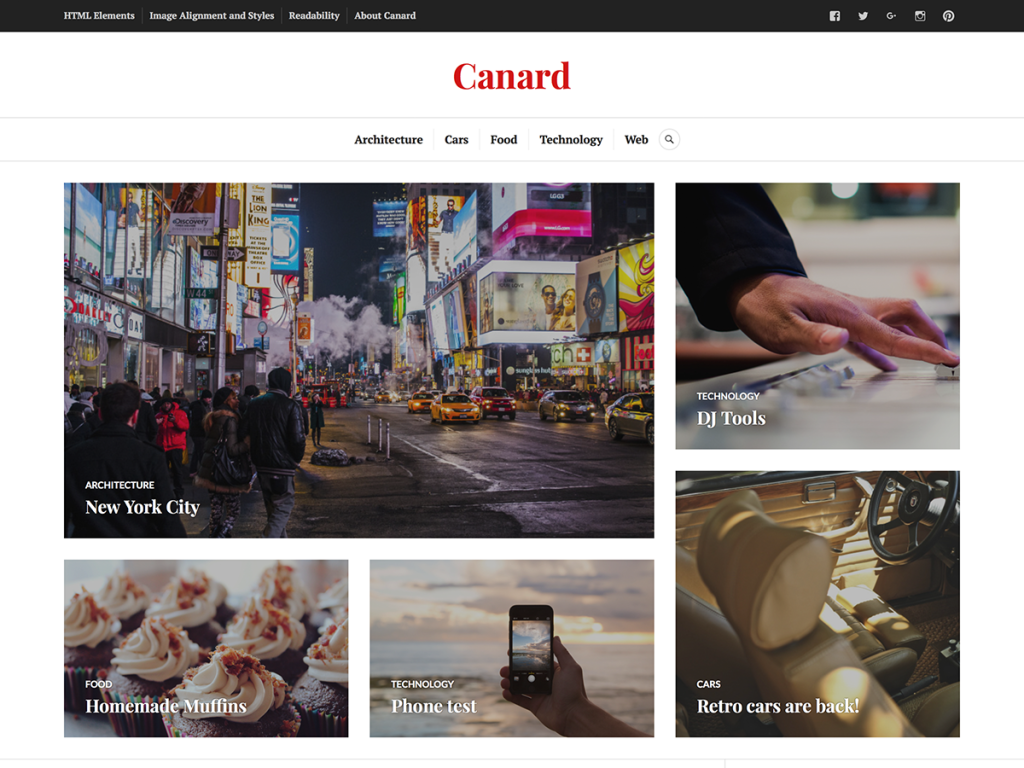
Built around the brisk cadence of an independent digital magazine, Canard immediately gave my staging feed real editorial structure. Its light white-and-red contrast highlights lead stories at the top of the homepage while maintaining calm readability across a classic two-column stream with a right sidebar. In my view, the way it balances prominent photography with clean headline hierarchy makes busy multi-author blogs easy to scan.
Built on Classic PHP templates—including content-featured-post.php and content-link.php—Canard supports post formats, a social menu, custom headers, and rtl.css. Extended newsroom tools such as Featured Content, Infinite Scroll, Responsive Videos, and Site Logo connect via Jetpack compatibility rather than native FSE blocks. Carrying an 80% rating across four reviews and roughly 800 active installs, I think it remains a tidy Classic pick for small online magazines.
Notes
- Editorial Feel: Dedicated featured-post and link templates pair strong news photography with crisp light-and-red magazine contrast.
- Classic Layout: Responsive two-column framing, a right sidebar, post formats, and social menus organize busy editorial feeds cleanly.
- Caveat: Featured Content carousels and Infinite Scroll lean on Jetpack, and there is no Site Editor or block-pattern workflow.
Verified Specifications
- Developer: Automattic
- Active Installations: 800+
- Reviewed Version: v1.0.7
- Directory Rating: 80% positive (4 reviews)
- Compatibility: WordPress 4.0+
- Architecture: Classic / Universal Theme
- Key Capabilities: Featured article spotlight, Post formats, Social menu, Jetpack compatibility, RTL support
Verdict: I’d pick Canard when I want a classic, photo-friendly magazine theme and already plan to run Jetpack. — Official WordPress.org Directory Entry
Discussion
0 Comments